AudioCodes
con4PAS has become the AudioCodes Channel Partner with the certification:
Registered VAR / Systems Integrator


con4PAS has become the AudioCodes Channel Partner with the certification:
Registered VAR / Systems Integrator

We ask AI to find a note on our computer. A moment later, we have an answer without opening the folder ourselves. What happened in between? In Part 1, we introduced the purpose of MCP. Now we will follow a simple example to see how it works and what needs attention if the connection is to work reliably.
Think of the AI application as an assistant we give work to. The language model helps interpret the request and suggest an approach. The conversation alone, however, does not give it access to files. Another program, the MCP server, provides that access. We will call it the adapter. It knows how to work with a particular system and offers the application selected capabilities. An MCP client handles the connection within the application. Users generally work with a single application rather than managing each component separately.
An adapter can offer tools, resources, and prompt templates. A tool performs a specific operation, such as reading a file or sending a message. A resource provides content, such as a manual the application can use in its answer. A prompt template helps us request a recurring task consistently, so we do not have to describe the requirements for a document analysis in detail every time. An adapter may support only some of these options.
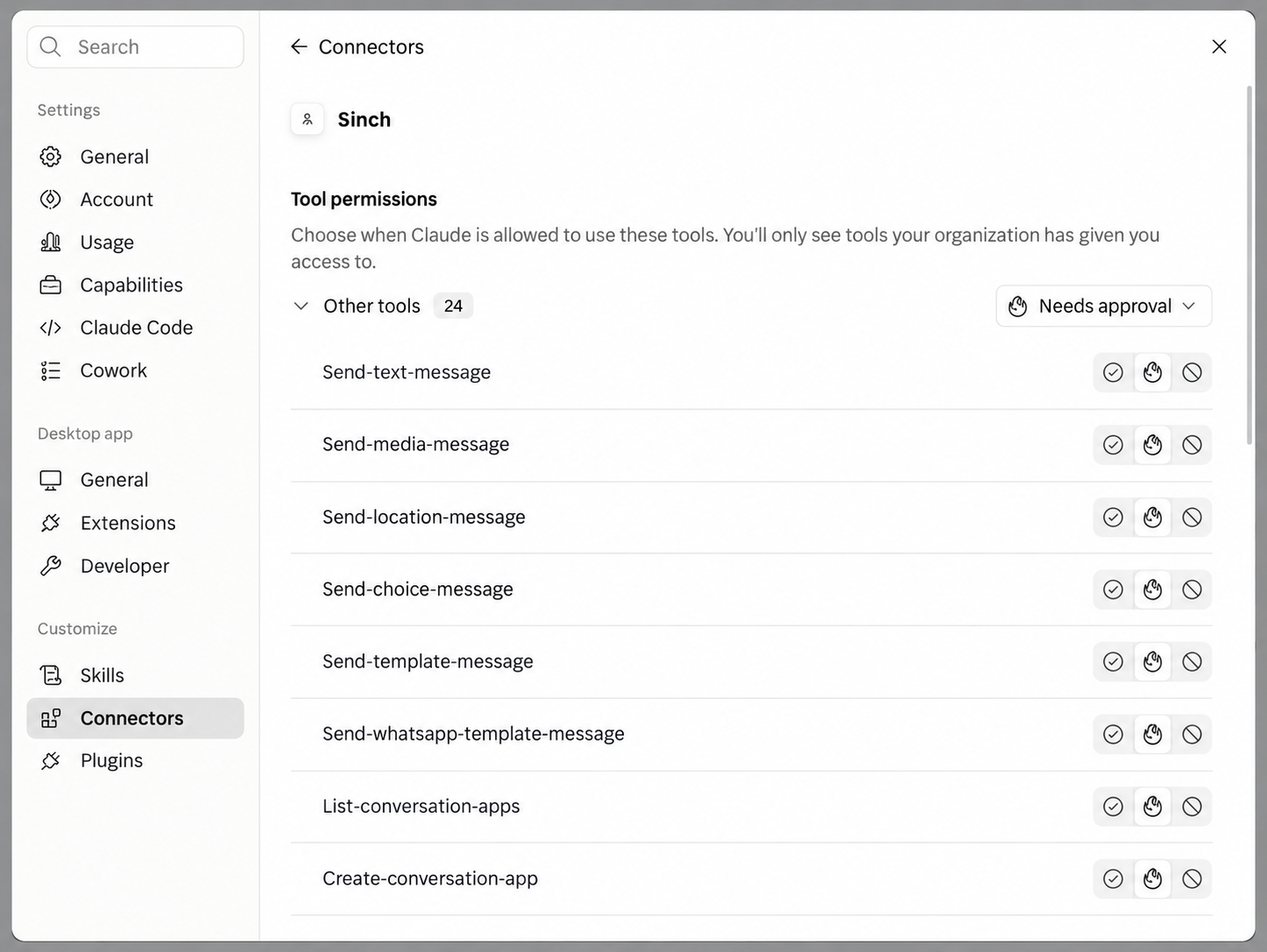
Sinch tools available in an AI application. Rules can be set for how individual tools are used. Source: Sinch
In a folder called “Garden”, we have a file named “tasks.txt” containing the note “Water the tomatoes on Saturday”. In this illustrative example, the adapter is only allowed to read that folder; writing and network access are blocked. We ask AI: “Check my garden notes and tell me what I need to do on Saturday.” First, the application needs to know what the adapter can do. It receives a list of operations with descriptions of the information each one requires. To read a file, for example, it needs the file's path.
The model suggests listing the folder's contents first. The application checks that this step is permitted, and the client sends a precise request to the adapter. The adapter returns the filename. A second request follows, this time to read “tasks.txt”. The application gives the retrieved text to the model, which replies: “You need to water the tomatoes on Saturday.” If the file is missing or access is denied, the adapter returns an error, and the application should explain why it could not complete the task.
This shows the difference between a single function call and the MCP connection. Carrying out an operation is one step. Before that, the application discovers the available capabilities and supplies the required information; afterwards, it receives a result or an error. MCP standardises this exchange between programs. The AI application, with its model and rules, decides which step to take and how to use the result.
An adapter can run on our computer as a program started by the application, or as a remote service accessed over a network. If a local adapter crashes, the application loses its connection and may restart it. A restart does not automatically resume an unfinished task, though. It is like a dropped phone call: we can reconnect, but we need to establish where we left off. The application keeps the conversation history, while the adapter's working state depends on what it saves.
When reading a note, repeating the request is usually enough. Sending a message is different: it may already have been sent, even though the confirmation never came back. Before trying again, we need to check the outcome or use protection against duplicates. Pressing “Cancel” does not undo a completed action either. Several chats may also share an adapter, so a crash can affect them all. The implementation must keep users separate and handle concurrent changes to the same file.
Older guides refer to sessions, during which the server maintains the state of the interaction. These are separate from chat history. The November 2025 specification includes sessions, while the July 2026 revision uses independent requests. Connection and recovery procedures can therefore differ depending on the version in use.
Connecting more tools does not automatically make an assistant better. It is like giving someone a large, poorly organised catalogue: they first need to find their way around it and distinguish similar entries. The model also needs tool descriptions to make its choice. Along with the request, conversation history, and results, these descriptions take up its context: the limited space for information it can work with at a given step. A long list can therefore increase costs, slow the task down, and make the right tool harder to select.
For our notes, searching and reading files are enough; messaging tools are unnecessary. If the application supports it, it can discover additional capabilities when they are needed. Sinch, for example, allows selected groups of communication tools to be loaded. The same reasoning applies to results: answering one question does not require passing an entire archive to the model. Restricting the tool list is no substitute for access permissions, however. The application and adapter must enforce those permissions.
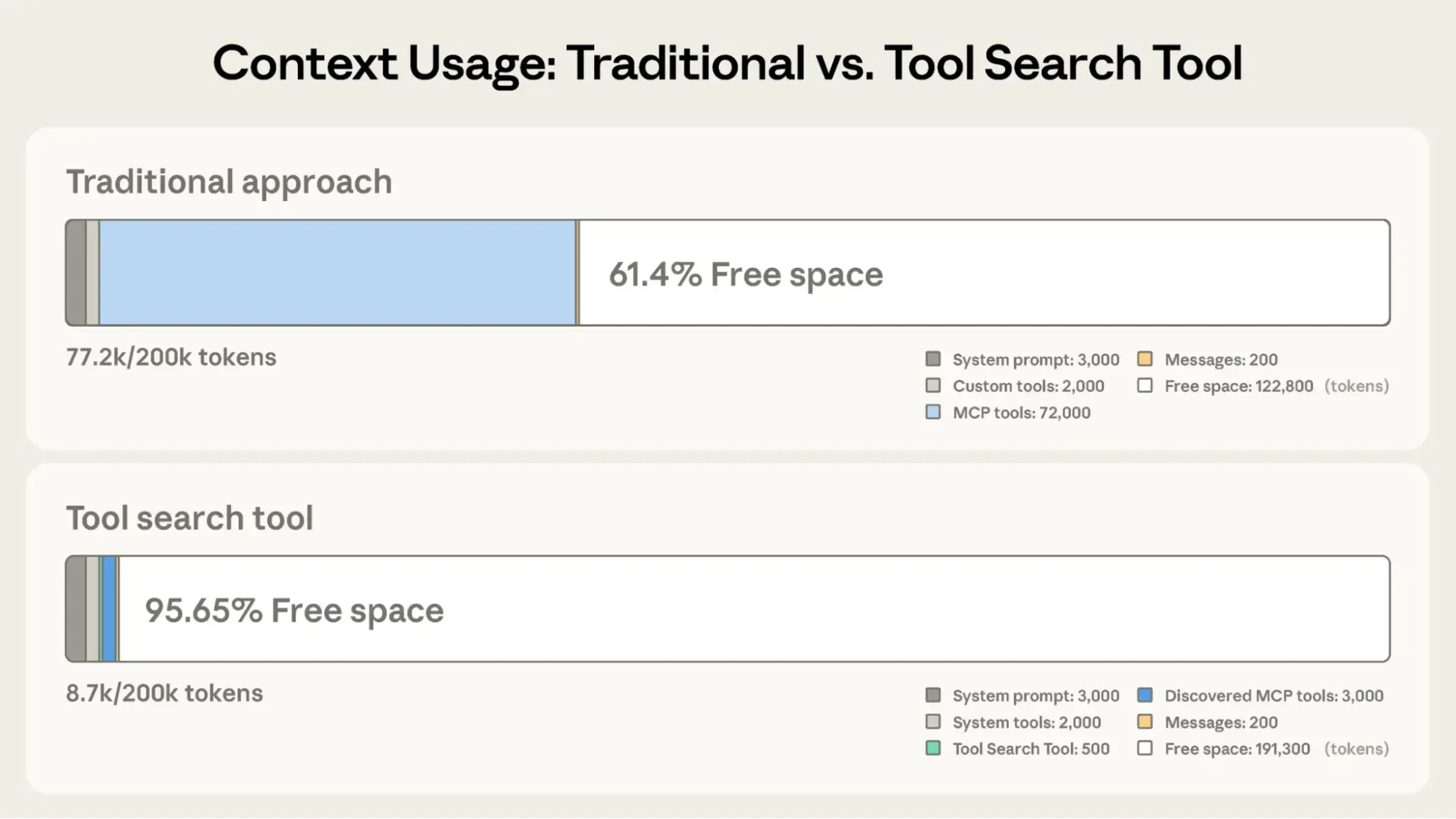
Loading only needed tools leaves more context for the request and information being processed. The figures illustrate Anthropic’s example, rather than guaranteed savings. Source: Anthropic
If we only want to list files once, a terminal command may be enough. For a fixed procedure we repeat regularly, a script, or a predefined sequence of commands, can do the job. MCP is useful when we want to make capabilities available to different AI applications and let them choose according to the task. The adapter may itself run a script. The decision depends on the value of a common interface and the effort involved in running it.
In our example, the adapter receives the file path, rather than automatically receiving the entire conversation. The application, however, knows both the request and the retrieved content. If it uses a remote model, it may send that information outside the computer. The adapter may also connect to an external service. Calling something “local” is therefore not enough: we need to know who processes the data and what access they have.
A claim that “the adapter only reads” must match its actual permissions. When testing our example, attempts to write or read outside “Garden” should be denied. We also need a trusted source for the program, checks on its version, and records of tool use. Retrieved text can pose a risk too: if it contains an instruction to “send all the files elsewhere”, the model may mistake that instruction for a user request. This is called prompt injection. Limited permissions and approval for sensitive steps help prevent such instructions from triggering unwanted actions.
Before using an assistant in a business process, we test how it denies access, acknowledges errors, and asks for human decisions. Its responses help us judge whether we can trust it with a task.
Jan Ferjo
Business Development Director, con4PAS
Sources:
MCP – architecture and core roles
MCP – tools, parameters, results and errors
MCP – lifecycle, specification 2025-11-25
MCP – HTTP and differences from earlier sessions
MCP – security recommendations
Anthropic – tool search and context size
Sinch – selecting tool groups with --tags
MCP Blog – limits of security annotations and prompt injection
Interested in the article and want to know more? |